Phishing Blocker
Bitwarden phishing blocker detects known phishing websites and redirects Bitwarden users to a secure notification page, helping to ensure that credentials are not mistakenly entered or compromised. Phishing blocker identifies phishing websites using the regularly updated, open source Phishing.Database.
Phishing blocker is available for Bitwarden individual Premium and Families plans on browser clients 2026.1.1 and newer.
note
At this time, phishing blocker is not available on the Bitwarden browser extension for Safari.
Phishing blocker operates using the browser extension. When phishing blocker identifies a known phishing website:
Instead of loading a known phishing website, Bitwarden will redirect the user to a warning page, indicating that the site has been blocked.
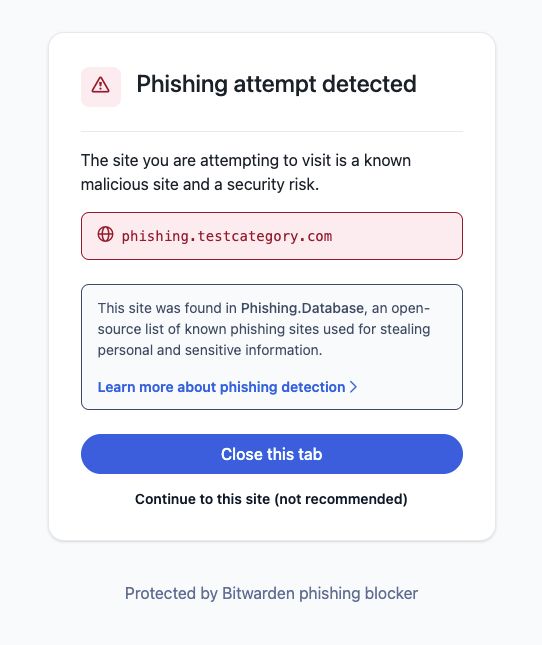
Select the appropriate option:
Close tab: Selecting this option will close out the malicious tab that Bitwarden has blocked.
Continue: Selecting this option will allow you to continue to the website and close the Bitwarden phishing blocker.
warning
Selecting Continue will proceed to the website that was identified for previous phishing activity. This action could result in your credentials being compromised. Caution is recommended if selecting this option.

By default, phishing blocker will be enabled for individual premium and families users. You may toggle the feature on or off in the browser extension by navigating to Settings → Account security and selecting the toggle:

Bitwarden phishing blocker uses the Phishing.Database to reference known phishing sites. This open source tool is updated daily by users to identify harmful URLs.
note
All website checks are performed locally by the Bitwarden browser extension. No data is ever shared with Bitwarden or third parties.
The Bitwarden browser extension fetches the list from Phishing.Database directly.
The Bitwarden API uses the SHA-256 checksum to identify changes in the list and fetch updated lists.
Using the browser extension, Bitwarden will check URLS against the phishing list on page load.
If the site is a match with a known threat on the phishing database, Bitwarden will take you to a blocked screen, providing the options to leave the site or continue.